Notifications
Notifications are event-driven alerts delivered to users when something they follow changes. They are stored in PostgreSQL and optionally dispatched by email via Celery.


How it works
Entity changes (event, attribute, object, correlation, hunt result)
      │
      ▼
Repository creates Notification rows for each follower
      │
      ▼
Celery send_email task dispatched (per-user opt-in, rate-limited)
      │
      ▼
User reads notifications via GET /notifications
Following entities
To follow an Event or Attribute one can click on the :fa:fontawesome-solid-star: icon.


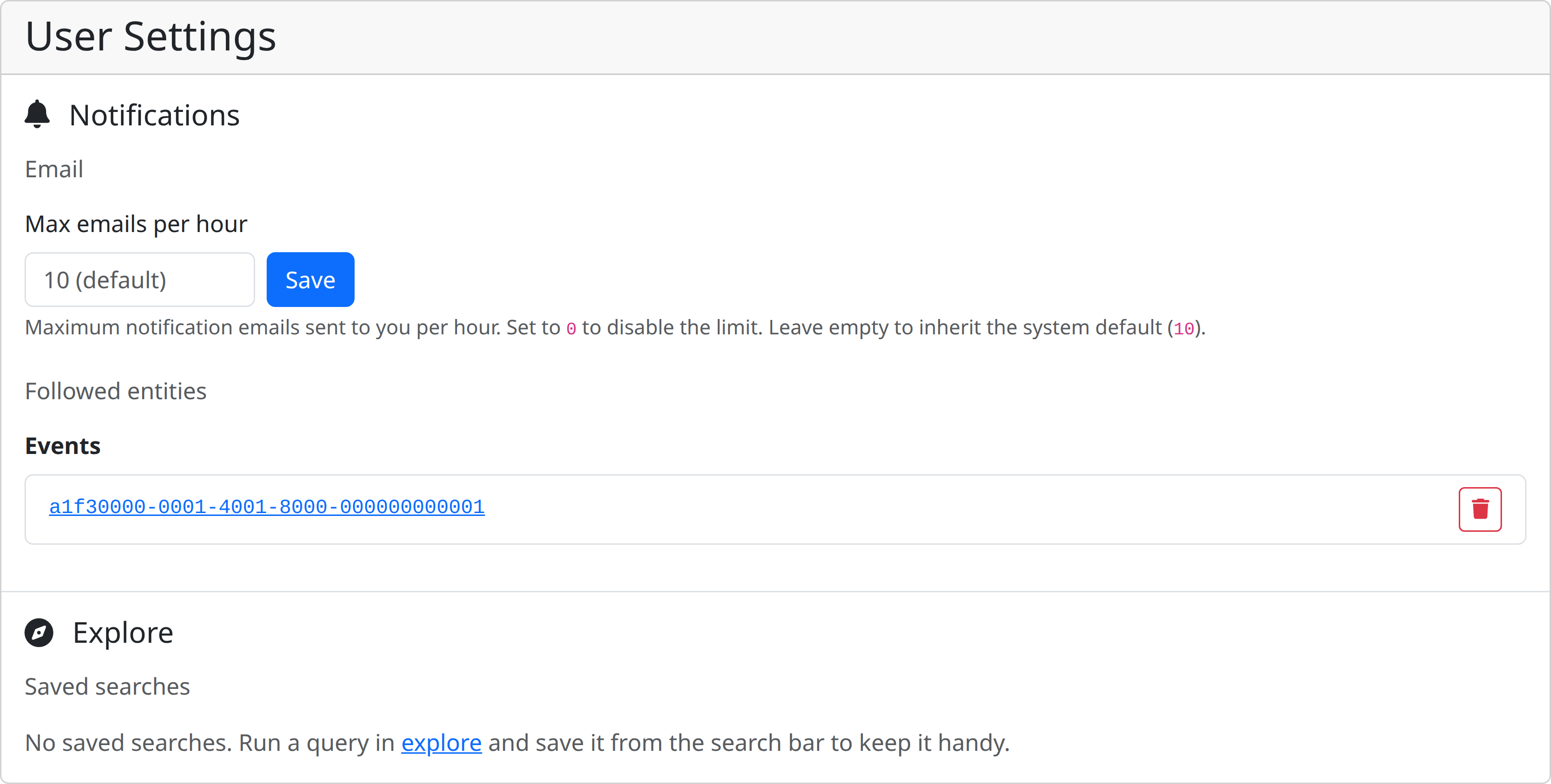
Follows are stored in user settings under the notifications namespace. The follow key holds lists of UUIDs per entity type.
You check the followed entities by navigating to internals → user settings → notifications.
Using the API
{
  "follow": {
    "events": ["<event-uuid>", "<event-uuid>"],
    "attributes": ["<attribute-uuid>"],
    "objects": ["<object-uuid>"],
    "organisations": ["<organisation-uuid>"]
  },
  "email_notifications": true
}
To stop following a specific entity, remove its UUID from the relevant list and POST the updated settings. You can also unfollow directly from a notification:
This removes the entity UUID from your follow list and deletes the notification in one step.
Notification types
Notifications are identified by a dot-separated type string.
Event notifications
| Type | Trigger |
|---|---|
event.created |
A followed event is created |
event.updated |
A followed event is updated |
event.deleted |
A followed event is deleted |
organisation.event.created |
A followed organisation publishes a new event |
organisation.event.updated |
A followed organisation updates an event |
Attribute notifications
| Type | Trigger |
|---|---|
attribute.created |
A followed attribute is created |
attribute.updated |
A followed attribute is updated |
attribute.deleted |
A followed attribute is deleted |
attribute.sighting.created |
A sighting is recorded on a followed attribute |
attribute.correlation.created |
A new correlation is found for a followed attribute |
event.attribute.created |
An attribute is added to a followed event |
event.attribute.updated |
An attribute in a followed event is updated |
event.attribute.deleted |
An attribute in a followed event is deleted |
Object notifications
| Type | Trigger |
|---|---|
object.created |
A followed object is updated |
object.updated |
A followed object is updated |
event.object.created |
An object is added to a followed event |
event.object.updated |
An object in a followed event is updated |
object.attribute.created |
An attribute inside a followed object changes |
Hunt notifications
| Type | Trigger |
|---|---|
hunt.result.first_run |
A hunt produces results for the first time |
hunt.result.changed |
A subsequent run produces a different match count |
Hunt notifications are sent to the hunt owner automatically — no follow configuration needed.
Notification payload
Each notification carries a payload object with context-specific fields.
Event payload:
{
  "event_uuid": "...",
  "event_name": "Malware campaign X",
  "organisation_uuid": "...",
  "organisation_name": "ACME Corp"
}
Attribute payload:
{
  "event_uuid": "...",
  "event_title": "Malware campaign X",
  "attribute_value": "1.2.3.4",
  "attribute_type": "ip-src"
}
Correlation payload:
{
  "source_event_uuid": "...",
  "target_event_uuid": "...",
  "target_attribute_uuid": "...",
  "target_attribute_type": "ip-src",
  "target_attribute_value": "1.2.3.4"
}
Hunt payload:
Email notifications
When a notification is created, a Celery send_email task is dispatched for each recipient — subject to two controls:
| Control | Where | Default |
|---|---|---|
| Per-user opt-out | User setting notifications.email_notifications (bool) |
true |
| Rate limit | Runtime setting notifications.email_max_per_hour (int) |
10 |
Set email_notifications: false in your user settings to disable email entirely. Set the runtime value to 0 to remove the rate limit.
API reference
| Method | Path | Description | Scopes |
|---|---|---|---|
GET |
/notifications |
List your notifications (paginated) | notifications:read |
PATCH |
/notifications/{id}/read |
Mark one or all notifications as read | notifications:update |
PATCH |
/notifications/{id}/unfollow |
Unfollow the entity and delete the notification | notifications:update |
DELETE |
/notifications/{id} |
Delete a notification | notifications:update |
DELETE |
/notifications/all |
Delete all your notifications | notifications:update |
Filtering
GET /notifications accepts optional query parameters:
| Parameter | Description |
|---|---|
type |
Filter by notification type (exact match) |
read |
true / false to filter by read status |
filter |
Substring match on notification type |
Mark all as read
Pass all as the notification_id: