Event Retention
Event retention automatically purges events older than a configurable period. It is opt-in and disabled by default. Events tagged with exempt tags are excluded from retention enforcement.
How it works
Runtime settings define retention policy
      │
      ▼
Celery Beat fires enforce_retention on schedule
      │
      ▼
Task queries OpenSearch for non-deleted events older than cutoff
      │  (events with exempt tags are excluded)
      ▼
For each expired event:
  ├── delete sightings (via attribute UUIDs)
  ├── delete correlations
  └── delete event + attributes + objects
      │
      ▼
Each purged event UUID is logged
Configuration
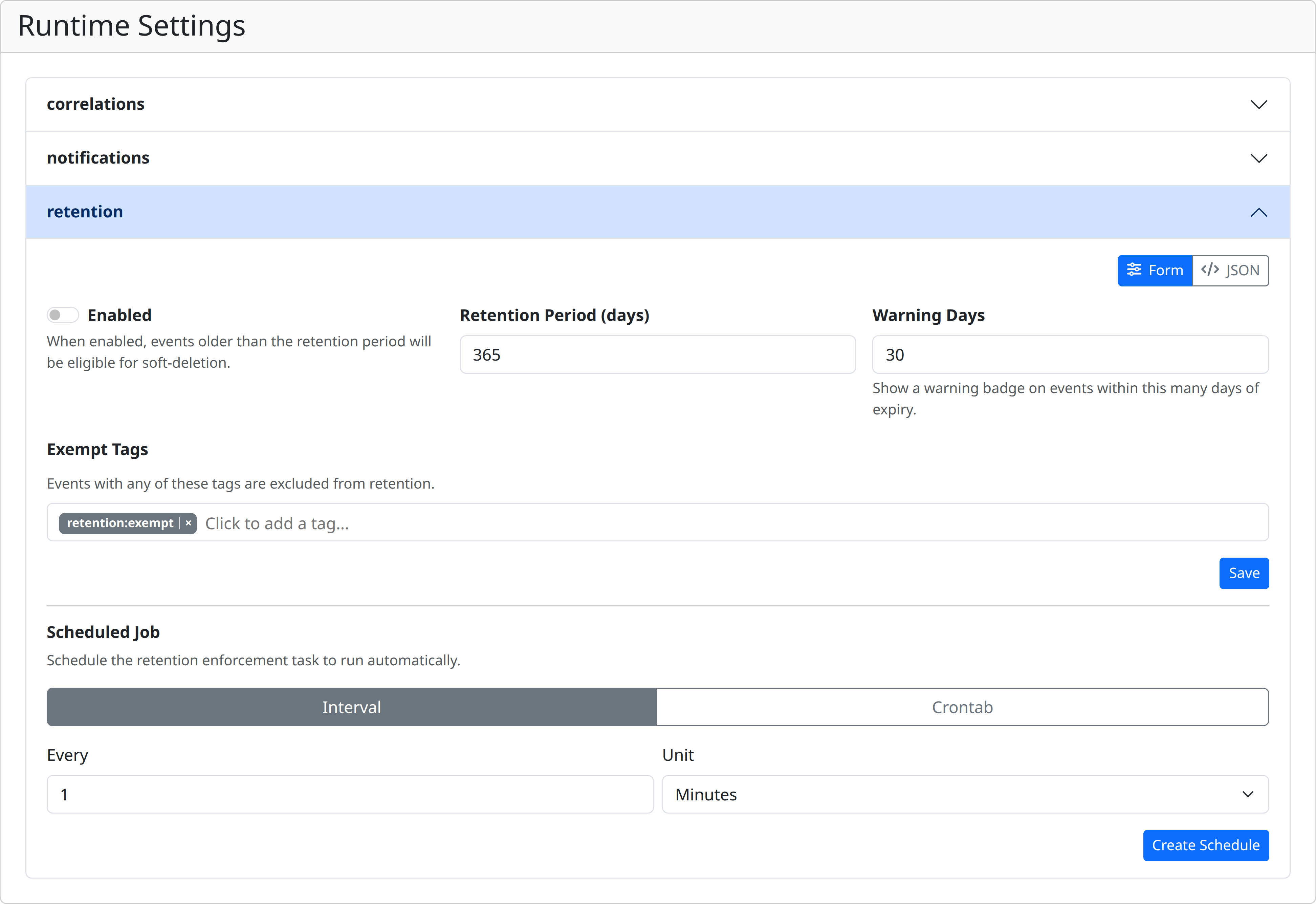
Retention is configured via runtime settings under the retention namespace. Navigate to Internals → Runtime Settings → retention.
| Setting | Type | Default | Description |
|---|---|---|---|
enabled |
bool | false |
Master switch — retention is not enforced when disabled |
period_days |
int | 365 |
Events older than this many days become eligible for deletion |
warning_days |
int | 30 |
Events within this many days of expiry show a warning badge |
exempt_tags |
string[] | ["retention:exempt"] |
Events carrying any of these tags are never deleted |
Exempt tags
Any event tagged with one of the configured exempt tags is excluded from retention, regardless of age. Use this to protect important events from automatic deletion. Tags are matched by exact name against the event's tag list.
Retention badges
When retention is enabled, events approaching their expiry date display badges in the UI (event detail view and explore results):
| Badge | Condition |
|---|---|
expired (red) |
Event is past its retention deadline |
expires in Xd (yellow) |
Event expires within warning_days |
Badges are not shown for events that carry an exempt tag or when retention is disabled.
Enforcement task
The enforce_retention Celery task performs the actual deletion. For each eligible event it:
- Collects all attribute UUIDs belonging to the event
- Deletes sightings referencing those attributes
- Deletes correlations linked to the event
- Deletes the event document and all its attributes and objects from OpenSearch
This is a hard delete — purged data cannot be recovered.
Scheduling
The enforcement task can be scheduled directly from the retention settings page. When no schedule exists, a schedule editor is shown where you can configure either an interval-based or crontab-based schedule. Once created, the schedule info is displayed along with a Remove button.
You can also schedule the task via the API:
{
  "name": "retention-enforcement",
  "task": "app.worker.tasks.enforce_retention",
  "schedule_type": "interval",
  "interval": { "every": 24, "period": "hours" }
}
Manual run
Trigger a one-off run from Internals → Tasks → Scheduled, or via the API:
API reference
| Method | Path | Description | Scopes |
|---|---|---|---|
GET |
/events/retention/preview?period_days=N |
Count events that would be affected by a given retention period | settings:read |
GET |
/events/retention/status |
Current retention configuration (for badge rendering) | events:read |